The Upload Default
Think about the last time you used an online tool to edit a video, convert a file, or apply some effect. Chances are, you uploaded your file to a remote server, waited for it to process, and downloaded the result. It probably felt seamless. But here is the question most people never ask: what happened to your file after you downloaded the result?
I started asking that question seriously when I began building video tools, and the answers I found were not reassuring. Most online video tools have vague privacy policies about file retention. Some keep your files for hours. Some keep them for days. Some are genuinely unclear about whether they keep them at all. And many do not encrypt files at rest on their servers.
This is not a hypothetical concern. It is a practical reality that affects anyone who processes video through online tools, which in 2026 is a significant portion of the internet.
"Every time you upload a video to an online tool, you are trusting a company you probably know nothing about with content you might care a lot about. That trust equation deserves more scrutiny."
What Actually Happens When You Upload
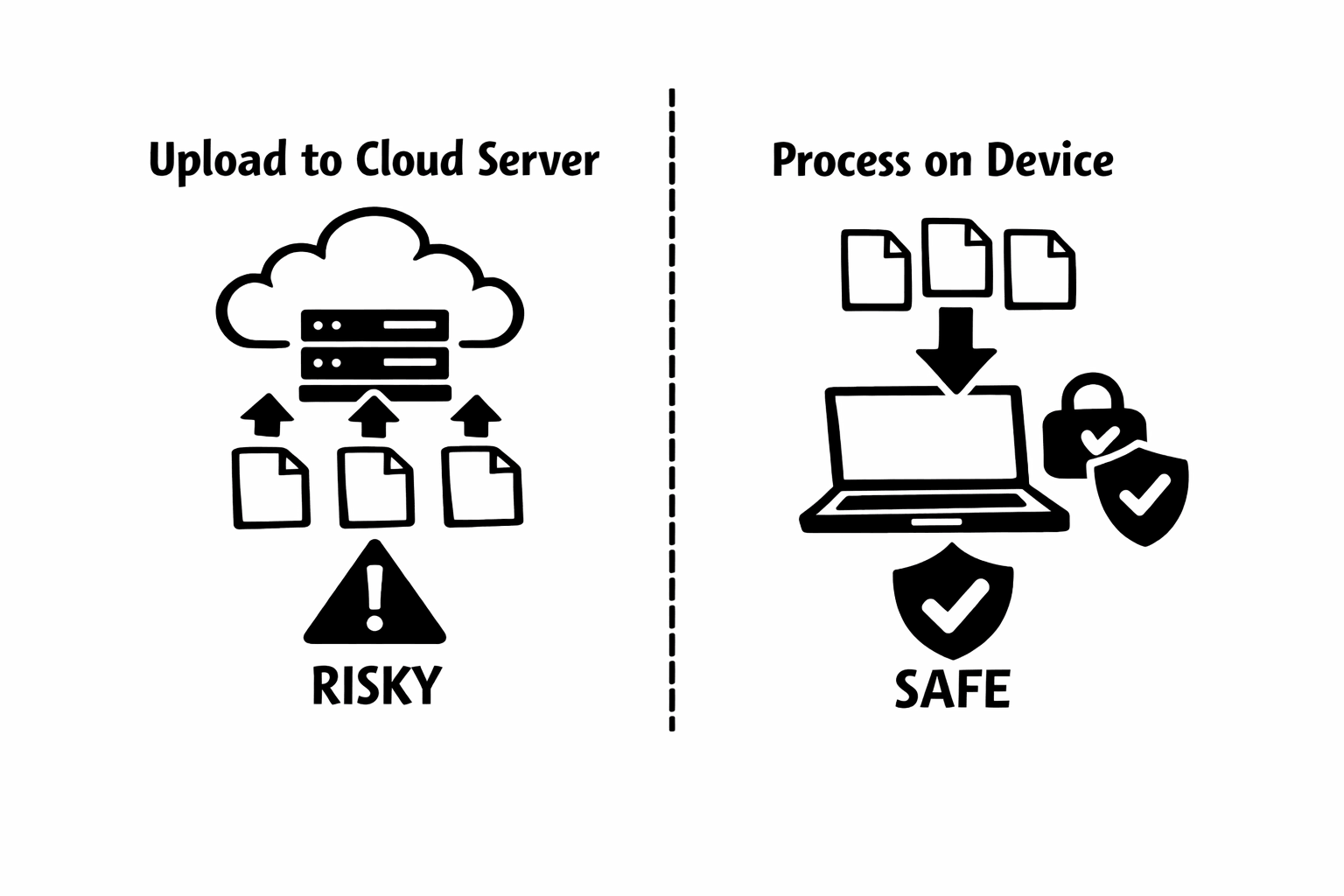
When you upload a video to a server-based processing tool, several things happen that most users do not think about. Your file travels across the internet, potentially passing through multiple network nodes. It arrives at the tool's server, where it is written to disk or stored in memory. The processing happens on their hardware, using their software. The result is stored until you download it.
At every stage, your file is potentially visible to the server operator, their employees, any third-party services they use for storage or processing, and anyone who might compromise their infrastructure. The file exists on hardware you do not control, in a jurisdiction you might not know, governed by a privacy policy you probably did not read.
For a funny cat video, this probably does not matter. For a screen recording that accidentally captured your email, a home video with your children's voices, a confidential business presentation, or any video with personally identifiable information, the risk calculus changes entirely.
Why Video Is Especially Sensitive
Video files are uniquely information-dense. A single video can contain faces (biometric data), voices (biometric data), location information (GPS metadata, visible landmarks), text (whiteboards, computer screens, documents), and audio of conversations that were not meant to be recorded or shared.
When we talk about data privacy, we often focus on structured data: names, emails, credit card numbers. But a video file can contain all of those things and more, embedded in ways that are hard to identify and redact. The audio track alone might contain phone numbers mentioned aloud, names of people not visible on screen, or background conversations from nearby rooms.
This is exactly why audio removal is often a privacy action, not just an editing one. People strip audio from videos to remove accidentally captured conversations, identifiable voices, and sensitive information. Ironically, uploading those videos to a remote server to remove the audio defeats the entire purpose.
The Local Processing Alternative
Local processing means your file never leaves your device. The processing code runs on your computer or phone, in your browser or in a native application, and the result is saved directly to your local storage. No upload, no server, no third party.
When I built Remove Audio with local processing as the core architecture, I was not making a feature decision. I was making a philosophical one. The question was not can we process video on a server. Of course we can. The question was should we. For a tool that handles potentially sensitive video content, my answer was no.
Local processing has genuine limitations. You cannot process files larger than your device's memory allows. You cannot run complex operations that exceed your device's processing power. You cannot hand off work to run in the background while you close the browser. These are real trade-offs. But the alternative, trusting an unknown server with your video files, has trade-offs too. They are just less visible.
How to Evaluate Any Online Video Tool
Whether or not you use my tool, here is what I think everyone should consider when choosing an online video tool.
Read the privacy policy. Specifically, look for how long files are retained after processing. Instant deletion is the gold standard. Anything longer deserves scrutiny. Vague language like files may be retained for service improvement is a red flag.
Check for upload activity. Open your browser's developer tools (F12 in most browsers, then click Network) before using any online tool. If you see large upload requests when you add a file, the tool is sending your video to a server. If you see nothing, it is processing locally.
Look for encryption claims. If a tool processes files on their server, they should encrypt files in transit (HTTPS) and at rest. If they do not mention encryption, assume there is none.
Consider the content. A public promotional video being processed by an online tool is low risk. A video containing faces, voices, screens, or any private information is higher risk. Match your tool choice to the sensitivity of your content.
"I am not saying every upload-based tool is malicious. Most are not. But convenience should not override basic questions about where your data goes and who can access it."
The Industry Should Do Better
As a developer in this space, I think the online tool industry has a responsibility to be more transparent about file handling. Too many tools bury their data practices in dense privacy policies that no one reads. Too few offer local processing alternatives. And almost none explain clearly what happens to your file after you click download.
The technology for local processing exists and is mature. WebAssembly, WebCodecs, and modern browser APIs make it possible to build powerful tools that never touch a user's files. The reason more tools do not use this approach is not technical. It is economic. Server-based processing allows tools to monetize user data, analyze content, and build datasets. Local processing gives up those revenue streams.
I chose to build Remove Audio with local processing because I believe it is the right approach for handling video content. The tool is supported by advertising, not by monetizing user data. I think more developers should consider this model, especially for tools that handle sensitive media.
Your Files Deserve Better Defaults
The current default for online video tools is upload first, ask questions never. I think that default is overdue for reconsideration. Not because every tool is untrustworthy, but because users deserve to make informed choices about where their content goes.
Local processing is not a silver bullet. It has limitations. But for common operations like removing audio, converting formats, or applying basic edits, it is a viable and more private alternative that the web platform now fully supports.
I built Remove Audio on the principle that your files should stay on your device unless you explicitly choose to share them. It is a small tool with a simple mission, but I hope it contributes to a broader conversation about how online tools should handle the content we trust them with.